Most SaaS startups don’t fail their first security review because the framework was too hard. They fail because nobody owned login abuse until a customer flagged it. They fail because admin role changes were trusted on the client side. They fail because webhooks weren’t signed and a third party became an attacker.
These are not exotic problems. They are basic ones, and they almost always trace back to the same root cause: there was no moment in the build process where someone asked, “how could this be misused?”
That moment is what threat modeling is for. The mistake most teams make is treating it as a heavyweight process that requires a security engineer, a 70-page framework, and a week of meetings. For an MVP-stage SaaS team shipping weekly, that approach guarantees the work never happens.
This post lays out a different approach: a 60-minute, one-page threat model that an engineering team can run every sprint. It’s designed for the reality of early-stage SaaS — small teams, moving requirements, and product pressure that doesn’t respect a “someday security roadmap.” The output is concrete: three controls, three owners, three due dates, before you ship.
Why 60 Minutes Is the Right Time Box
Short sessions force decisions. A threat modeling exercise that runs over two hours will get one of three outcomes: people stop attending, people start tuning out, or the team produces a beautiful artifact that no one updates after the meeting.
A 60-minute format respects three things that are true for early-stage teams:
You have a small team and finite attention. Two engineers, a founder, and a PM can hold a single threat-modeling session in their heads. They cannot hold a four-hour architecture review and still ship the sprint.
Your product changes weekly. A model produced over a week becomes stale before it’s reviewed. A 60-minute model can be re-run on the next sprint when something new ships.
Decisions matter more than completeness. You don’t need to enumerate every threat. You need to identify the highest-risk paths and pick the smallest controls that close them. That’s an order-of-magnitude problem, not a precision problem.
The cost of skipping this work is rarely the cost of an incident itself. It’s the cost of fixing the incident after launch — session invalidation, support tickets, trust-repair emails, and a sprint of emergency patching. Teams that skip the 60-minute exercise routinely spend three weeks cleaning up what one hour would have prevented.
NIST’s Special Publication 800-30 frames risk assessment as a decision-support mechanism, not a paperwork ritual. That framing aligns exactly with what an MVP team needs: a structured way to make defensible security decisions quickly, with documented rationale.
What “Good Enough for Launch” Actually Means
Good enough does not mean “no known risk.” That bar is unreachable, and chasing it produces security theater. Good enough means:
- Your crown-jewel assets are explicitly named and documented.
- Your top abuse paths have been identified and have concrete mitigations.
- Every unresolved high-risk item has an owner and a due date.
If those three things are true, you can defend your release decision to a board, an investor, or an enterprise prospect’s security review team. If they aren’t, you’re flying on hope.
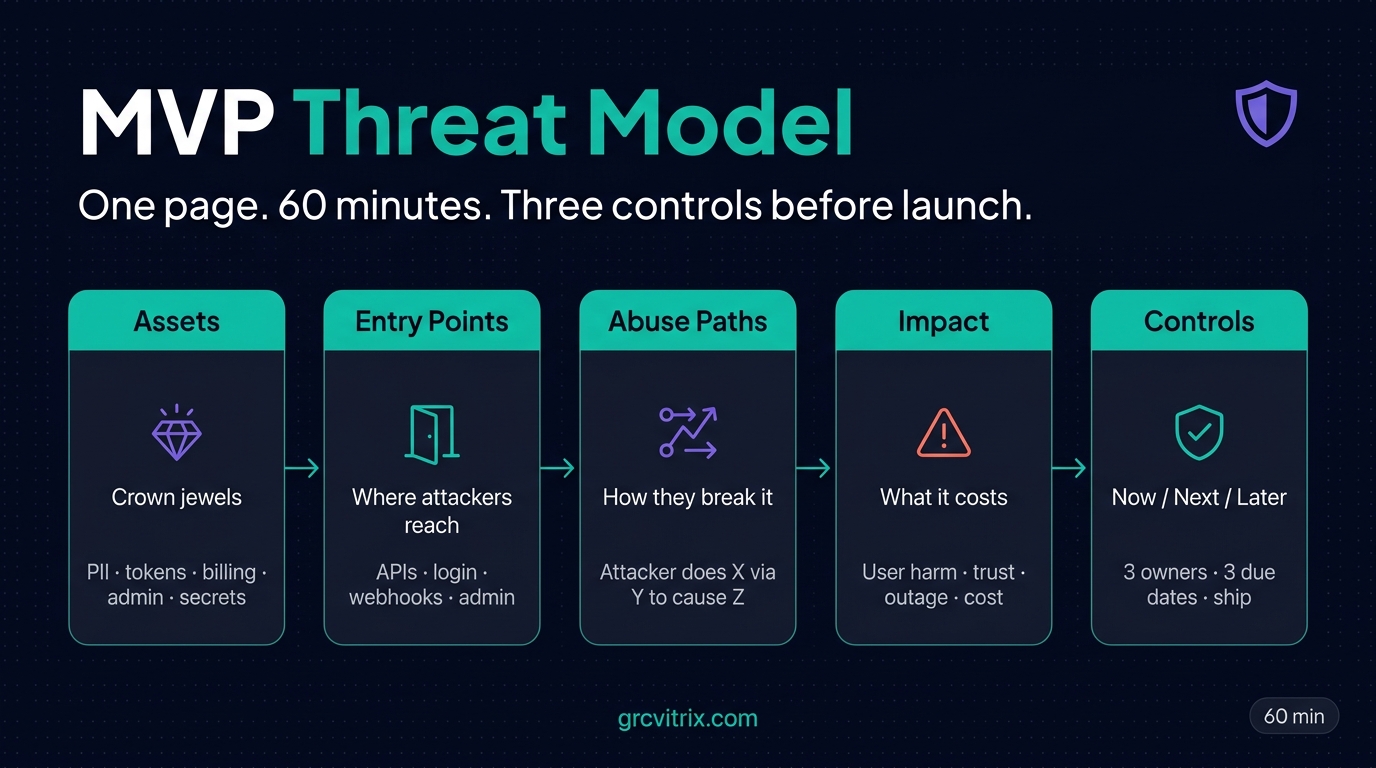
The One-Page Threat Model: Five Boxes
The entire model fits on one page. If your version doesn’t fit on one page, you’ve already lost adoption — no one will maintain a 12-page document during a sprint crunch.
The five boxes:
1. Assets (Crown Jewels)
What do you actually need to protect? For most early-stage SaaS, this list is short:
- User PII (emails, names, sometimes addresses)
- Authentication tokens and session state
- Billing data and payment events
- Admin actions and privileged operations
- Source code secrets, API keys, and infrastructure credentials
Five to seven items maximum. If your asset list runs to 15, you’re including infrastructure trivia that doesn’t drive decisions.
2. Entry Points
Where can an attacker reach your system? Inventory the externally reachable surface:
- Signup and login flows
- Public APIs (authenticated and unauthenticated)
- File upload endpoints
- Webhook receivers
- Admin panels
- Third-party integration callbacks
Be specific. “Our API” is not an entry point. “POST /api/orders/{id}” is.
3. Abuse Paths
How could each entry point be misused to compromise an asset? Phrase each path as a single sentence following this template:
“Attacker does X via Y to cause Z.”
Examples:
- “Attacker submits a manipulated object ID on /api/orders/{id} to read another tenant’s invoice.”
- “Attacker replays a webhook payload to trigger duplicate payment processing.”
- “Attacker resets a victim’s password and receives a long-lived token that survives the password change.”
Keep each abuse path concrete. Behavior-first, not framework-first. If you can’t describe the attack in one sentence, you don’t understand it well enough to mitigate it.
4. Impact
For each abuse path, what does it cost when it happens? The impact column drives prioritization:
- User harm (data exposure, account takeover, financial loss)
- Trust damage (public disclosure, customer churn)
- Operational impact (outage, support load)
- Cost spike (resource consumption, API abuse)
- Contractual or legal exposure (SLA breach, regulatory finding)
5. Controls (Now / Next / Later)
For the highest-impact, most-likely paths, what’s the smallest effective control?
- Now: must ship before launch or before this risk reaches production
- Next: in the next sprint
- Later: documented technical debt, with a re-evaluation trigger
The “Later” category is where good intentions die if you don’t write down the trigger that brings the item back. Use specific triggers: “Revisit when we onboard our first enterprise customer” or “Revisit when monthly traffic exceeds 100k requests.”
The 60-Minute Sprint, Minute by Minute
Here’s how the time actually breaks down:
0–10 minutes: Define crown-jewel assets
Ask one question: “If this leaks, what hurts users fastest?” Write down the top five answers. Don’t debate. The list will refine itself in later cycles.
10–25 minutes: Map the top three user journeys
Pick journeys that move identity, permissions, or money. Onboarding, checkout, role changes, password reset, admin actions. Don’t map every click. Map where state changes that an attacker would care about.
25–40 minutes: Brainstorm realistic attacker moves
For each journey, ask: “How would I break this in under 10 minutes if I were angry and bored?” Write each abuse path as one sentence. Aim for five to ten paths total. If you produce 30, you’re not prioritizing — you’re listing.
40–50 minutes: Score risk fast
Use a 1–3 scale for likelihood and impact. Multiply for a score from 1 to 9.
- 1–2: monitor
- 3–4: schedule for next sprint
- 6–9: pre-launch action required (or accept with a documented compensating control)
A 1–3 scale keeps momentum. A 1–10 scale invites debate that consumes the meeting.
50–60 minutes: Pick top three mitigations and assign owners
For your three highest-scored paths, pick the smallest control that closes the gap. Common high-leverage controls:
- Server-side authorization checks on object IDs
- Webhook signature verification
- Token expiry tuning and revocation on password change
- Rate limiting on expensive endpoints
- Audit logging on privileged actions
Each control gets one owner, one due date, and one acceptance test. No ambiguity.
You leave the meeting with three decisions. Not 14 nice ideas. Three.
Start With Abuse Paths, Not Framework Jargon
Frameworks are useful, but jargon becomes procrastination dressed up as rigor. Teams that argue about whether to use STRIDE or PASTA or DREAD often produce nothing for a week. Teams that ask “how could this be misused?” produce a working model in an hour.
If you want a structured prompt, use STRIDE-lite — borrow the categories without the ceremony:
- Spoofing: authentication and session abuse
- Tampering: parameter manipulation, webhook forgery
- Repudiation: missing audit trail for sensitive actions
- Information disclosure: object-level access leaks (IDOR)
- Denial of service: unbounded requests or cost amplification
- Elevation of privilege: role boundary bypass
For modern API-driven SaaS, OWASP’s API Security Top 10 provides a more directly applicable taxonomy. The two categories you’ll encounter most often are Broken Object Level Authorization (BOLA) and Broken Authentication. If you only model two threat classes, model these.
The Three Threats Most MVPs Underestimate
Across early-stage SaaS, three patterns produce most of the post-launch incidents:
Session and Authentication Token Mishandling
Common failures:
- Long-lived tokens with no expiry policy
- Sessions that survive password resets
- Refresh tokens that aren’t revoked when access tokens are
- Inconsistent invalidation across devices
A common discovery during a first audit: the logout endpoint is decorative. The session token remains valid for days. Test this explicitly before launch.
Object-Level Access Bugs (IDOR)
When object IDs are sequential or guessable, and authorization is checked at the UI layer rather than the API layer, one crafted request can cross tenant boundaries. This is consistently the top API security finding in OWASP’s data because it’s frequent, exploitable, and trust-destroying.
The simplest test: log in as User A, capture an authenticated request that retrieves a record belonging to User A, then change the ID to one belonging to User B. If the response succeeds, you have an IDOR.
Third-Party Integration Trust Gaps
Every integration is a transitive trust decision. Payment providers, analytics platforms, CRM syncs, customer support widgets, AI tools — each one expands your attack surface. Two failure modes show up repeatedly:
- Webhook signatures aren’t validated. An attacker who knows your webhook URL can submit forged events that your system processes as legitimate.
- OAuth scopes are overbroad. A third-party tool requests “read all data” when it only needs “read events from the last 24 hours.”
Treat every third-party callback as untrusted input. Validate signatures. Replay-protect with timestamps and nonces. Scope permissions to the minimum needed.
The Pre-Launch Eligibility Checklist
Before you ship, walk through these four questions. Any “no” becomes a ticket with an owner and a due date.
- Token lifetime and revocation policy are documented and tested.
- Object-level authorization has been explicitly tested on the top three APIs.
- Webhook signatures are verified and replay-protected.
- Sensitive data is redacted from analytics payloads (client and server).
If you’re shipping a B2B SaaS product to enterprise buyers, add a fifth:
- Admin role changes are validated server-side and produce an audit log entry.
Common Mistakes That Create Expensive Rework
Four patterns produce the bulk of avoidable rework:
Modeling architecture instead of user behavior. If your model starts with boxes and arrows but no concrete user journeys, your controls drift into abstraction. Threats happen in behavior. Diagrams are documentation, not analysis.
Treating internal tools as trusted by default. Internal admin tools are often under-tested, over-permissioned, and reachable through VPN assumptions that age badly. Model them as high-impact surfaces, because that’s what they are when an attacker reaches them.
Deferring rate limiting to post-launch. Unrestricted resource consumption is both a security risk and a cost risk. A single misbehaving client (or attacker) can run up your bill, exhaust your database connection pool, or take down your service. Rate limiting is a Day 1 control, not a Day 60 optimization.
Findings without owners or deadlines. Security debt without ownership is a hope document. A mitigation without a date is a wish. Every item on your model needs a name attached and a date written down.
The Decision Card: Fix Now vs. Defer
For each high-risk finding, use this rule:
Fix Now if the path is public-facing, easy to automate, and impacts identity or data. The blast radius is large enough that a real attacker would find it within days of launch.
Defer with compensating control only if the blast radius is limited, a temporary mitigation exists, and the debt is documented with a specific re-evaluation trigger. The trigger has to be concrete: “When we hit 10,000 users,” not “When we have time.”
A practical rule of thumb: one pre-launch day usually beats one post-incident week.
Turning Findings Into a Pre-Launch Security Gate
Your security gate can be tiny and still effective. Three rules:
No unresolved high-risk authentication or authorization findings. Anything in the 6–9 score range is either fixed or has an explicit, documented compensating control with sign-off.
Critical logs are enabled for sensitive actions. Authentication events, role changes, privileged API calls, and admin operations all produce audit log entries.
The top three abuse paths from your model have implemented controls with proof. Not “we discussed it.” Implemented, with a PR link and an acceptance test.
For each control, write the ticket precisely. A bad ticket says “improve auth security.” A good ticket says “Refresh token invalidates when password changes; integration test fails if old token still accepts requests after password change.” Precision reduces debate and rework.
Connecting Threat Modeling to SOC 2 Readiness
If your roadmap includes SOC 2 — and for most B2B SaaS selling into mid-market or enterprise, it does — threat modeling does double duty.
The Trust Services Criteria don’t mandate threat modeling explicitly, but several common criteria controls are easier to demonstrate when you have a documented model:
- CC3.1 / CC3.2 (risk identification and assessment): your one-page model is direct evidence of structured risk identification.
- CC4.1 (monitoring activities): the sprint-cadence rerun shows continuous risk evaluation.
- CC7.1 (system operations and risk response): the controls and ownership map demonstrate that identified risks have assigned response activities.
Auditors don’t need a 70-page document. They need evidence that you identify risks, evaluate them, and act on them with documented decisions. A dated one-page model — repeated each sprint, with controls implemented and tested — provides that evidence with much less effort than building an audit-specific artifact from scratch.
For early-stage teams approaching their first SOC 2, this is one of the highest-leverage moves available: do the threat modeling work for product reasons, then reuse the artifacts as audit evidence later. The work compounds.
A Real Example: The Launch That Almost Wasn’t
A four-person B2B SaaS team — a founder, two engineers, and a contract designer — was 48 hours from launching their pilot. They had clean onboarding, polished analytics, and one hidden problem.
In a 60-minute threat-modeling session, an engineer asked a casual question: “What if someone intercepts the role-change request and modifies the role_id in the body?”
There was a long silence. Admin role changes were trusted on the client side. There was no server-side authorization check. There was no audit log entry. There was no alerting on unusual admin activity.
The team added three things over the next 3.5 hours of engineering work:
- A server-side authorization check that validated the requesting user’s permission to make the role change.
- An audit log entry on every role change, including the actor, the target, and the previous and new values.
- An alert on any role escalation to admin.
Three weeks later, an enterprise prospect asked a hard question about admin abuse controls during their security review. The team answered confidently, with PR links and test evidence. The prospect closed the pilot.
The point isn’t the specific controls. The point is that 60 minutes of structured questioning surfaced a launch-blocking issue that no checklist would have caught. The team knew their product. The session forced them to think about how someone else might use it.
The One-Page Template (Free Download)
The template is intentionally minimal: five sections, fits on one page, ready to fill in during your next 60-minute session.
Download the MVP Threat Model Template (PDF)
Download the Markdown Version (for Notion / Confluence)
The Markdown version is useful if your team works in Notion, Confluence, or any wiki — paste it into a new page and customize the sections for your stack.
What to Do in the Next 24 Hours
Three things, in order:
1. Block 60 minutes on your calendar this week for a threat-modeling sprint focused on one high-value flow. Pick the journey that touches identity and money — usually onboarding or checkout. Invite exactly three people: one decision-maker (founder or PM), one engineer who owns the target flow, and one engineer with backend or infra visibility.
2. Pre-create three empty tickets in your tracker, labeled “Owner,” “Due date,” and “Acceptance test.” You will fill them in by minute 60.
3. Schedule the next session for two weeks out. This is the cadence move that matters most. A one-time threat model is a snapshot. A recurring one is a security culture.
If you want a structured way to think about what your team should be measuring across these sessions, OWASP’s API Security project provides the most actionable baseline for modern SaaS. For a broader framing on building security into product decisions from the start, CISA’s Secure by Design guidance is the right mental model — particularly the principle of shifting security responsibility from end users to software makers through safer defaults.
FAQ
Do early-stage SaaS startups need threat modeling before SOC 2?
It’s not explicitly required by the framework, but auditors and enterprise buyers care whether you identify and manage security risk in a structured way. A lightweight, documented threat model provides direct evidence that risk decisions are intentional rather than accidental — which is exactly what CC3.1 and CC3.2 ask for.
How is threat modeling different from a penetration test?
Threat modeling is proactive, design-time risk identification. Penetration testing is point-in-time validation against a running system. Think of threat modeling as deciding where to reinforce the door, and penetration testing as paying someone to try to kick it down. You need both eventually, but threat modeling produces value earlier and at lower cost.
Can we do this without a dedicated security engineer?
Yes — most early-stage SaaS teams do. The format is more important than the title. Consistency matters more than specialization at this stage.
How often should we repeat the model?
At minimum once per sprint, or whenever one of these changes: authentication flow, data model, major integration, or public exposure level. A monthly cadence is a floor, not a ceiling.
What’s the minimum evidence to show enterprise buyers or investors?
A dated one-page model, top risks with assigned owners, mitigations that have been implemented with PR links, and proof of retest. Stale evidence hurts credibility more than minimal evidence.
Is this enough for HIPAA or fintech-adjacent products?
Not by itself. Use this as your operational baseline, then layer formal control frameworks, legal and compliance review, and deeper assurance processes as required by your domain.
Which roles should join the 60-minute session?
A decision-maker (founder or PM), an engineer who owns the target flow, and an engineer with backend or infrastructure visibility. Optionally a designer or support lead if they influence account recovery or admin operations.
Should we block launch if one high-risk item remains?
If it impacts identity, authorization boundaries, or cross-tenant data exposure, yes — block or implement a strong compensating control with a time-bound remediation plan. Trust is easier to keep than to recover.
What tool should we use — doc, board, or spreadsheet?
Whatever your team updates weekly. A plain doc is often enough. If you track many findings over time, add a board. If you need scoring history, use a spreadsheet. Tool choice matters less than the cadence and ownership model.
The Real Question
The opening question of this post was simple: can a fast-shipping team protect trust without heavyweight security ceremony?
The answer is yes, but only if you commit to one page, one hour, and one habit — converting risk into owned action before launch. You don’t need a perfect model. You need a living one.
A perfect model that’s never updated is documentation. A scrappy model that’s rerun every sprint is a security program.
In the next 15 minutes, do one thing: open your calendar, schedule a 60-minute threat-modeling sprint for your highest-value flow, and download the template below. Your future self, on incident day, will quietly thank you.
Want SOC 2 and security content built for early-stage SaaS teams? GRC Vitrix publishes practical, plain-language guides on security, compliance, and AI for technical teams. Visit grcvitrix.com.
Last reviewed: May 2026.