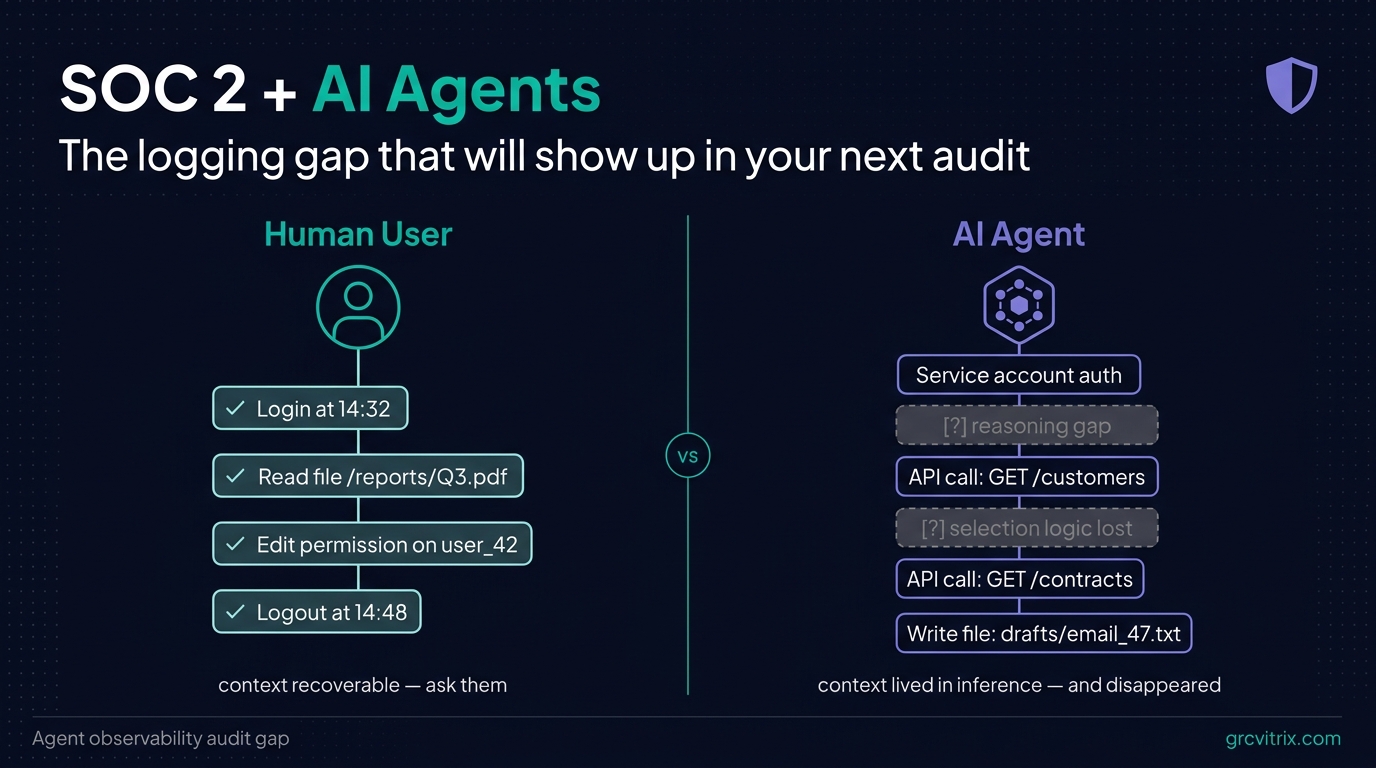
For about 20 years, SOC 2 logging worked because it answered one question: who did what, when?
User logs in. Developer pushes code. Admin changes a permission. Every meaningful action traced back to a human identity. Every framework — SOC 2, ISO 27001, NIST 800-53 — assumed this. Logging infrastructure was built around it.
AI agents are quietly breaking that assumption.
If you’re shipping AI features on top of customer data — even just an internal automation that summarizes vendor contracts or routes support tickets — you’re running a system that takes actions, accesses data, and makes decisions. Your SIEM sees the API calls. It does not see what the agent was trying to do, why it picked one file over another, or what it produced as a result.
For a human, that context is recoverable. You can ask them. For an agent action, the context lived in an inference call that ran in milliseconds and disappeared.
This is the gap. And it’s the one that’s going to show up in audit findings starting in 2027.
What SOC 2 Actually Asks About Logging
SOC 2 isn’t a checklist. It’s a set of trust criteria — Security, Availability, Processing Integrity, Confidentiality, and Privacy — that all circle the same question: can you prove who did what, when, and why?
Under the Common Criteria, the logging-relevant ones look like this:
- CC6.1: Logical access controls. Who has access to what, and how is access authorized?
- CC6.6: System monitoring of access and activity. Are you watching what authenticated users (and service accounts) actually do?
- CC7.2: Detection and monitoring of system anomalies. Can you spot when something deviates from expected behavior?
- CC7.3: Evaluation and response to security events. When something happens, can you reconstruct it?
For 20 years, “what authenticated users do” meant humans clicking through interfaces and developers running scripts. The logging stack — CloudTrail, application logs, SIEM, audit pipelines — was designed around that.
AI agents authenticate too. They hold credentials: API keys, OAuth tokens, service accounts, sometimes with elevated permissions. When they act, they generate the same kind of system events. But the events alone don’t answer the questions an auditor will ask.
Why AI Agent Logging Is Different
Here’s a typical AI agent workflow in a SaaS product:
A user asks the agent to “draft a renewal email for our top 10 enterprise customers.” The agent does the following in about 8 seconds:
- Queries the CRM for customers matching “tier = enterprise”
- Pulls each customer’s contract end date
- Filters for contracts expiring in the next 60 days
- Reads the most recent support ticket history per customer
- Calls the LLM API to draft personalized email copy
- Writes drafts to a “pending review” folder
Each step gets logged somewhere. Your CRM has a query log. Your contract system has a read log. Your support tool has an access log. Your LLM provider has an API call record. Your file storage has a write log.
If an auditor asks “what did the agent do for this user request?”, you can technically reconstruct it — by stitching together six different log sources, correlating timestamps, and inferring what was probably one workflow.
In practice, that reconstruction takes hours. And it only works if every log source is preserved with consistent metadata, which most aren’t.
The harder question — the one that breaks current logging — is “why did the agent choose those specific 10 customers?” The filtering logic, the ordering, the inclusion criteria, the data the agent considered and rejected — all of that lived in an inference call that ran and disappeared.
For a human action, you’d ask the person. For an agent action, there’s no one to ask.
What an Auditor Sees When They Look at Your AI Deployment
Picture an auditor working through your Security Common Criteria during a Type 2 audit. They’ve reviewed your access controls. They’ve sampled your SIEM logs. Everything looks clean.
Then they ask about the AI agent that drafts those renewal emails.
“Does the agent access customer data?”
Yes — CRM records, contract data, support history.
“Is access authorized? Show me how.”
Service account ABC has read permissions on those systems.
“Who or what triggered each agent run last month?”
User requests, plus a scheduled nightly job.
“Show me, for one specific run, what the agent accessed and why.”
Long pause.
The pause is the audit finding. The auditor isn’t asking a trick question. They’re testing CC6.6 (monitoring of access and activity) and CC7.3 (response to security events). For human users, you’d answer this in a few minutes. For agents, you currently can’t.
I keep seeing variations of this in early-stage SaaS conversations. Teams have shipped real AI features. They have logs that prove the infrastructure worked. They have nothing that proves the agent behaved appropriately.
The Four Things You Can’t Prove Without Agent-Specific Logs
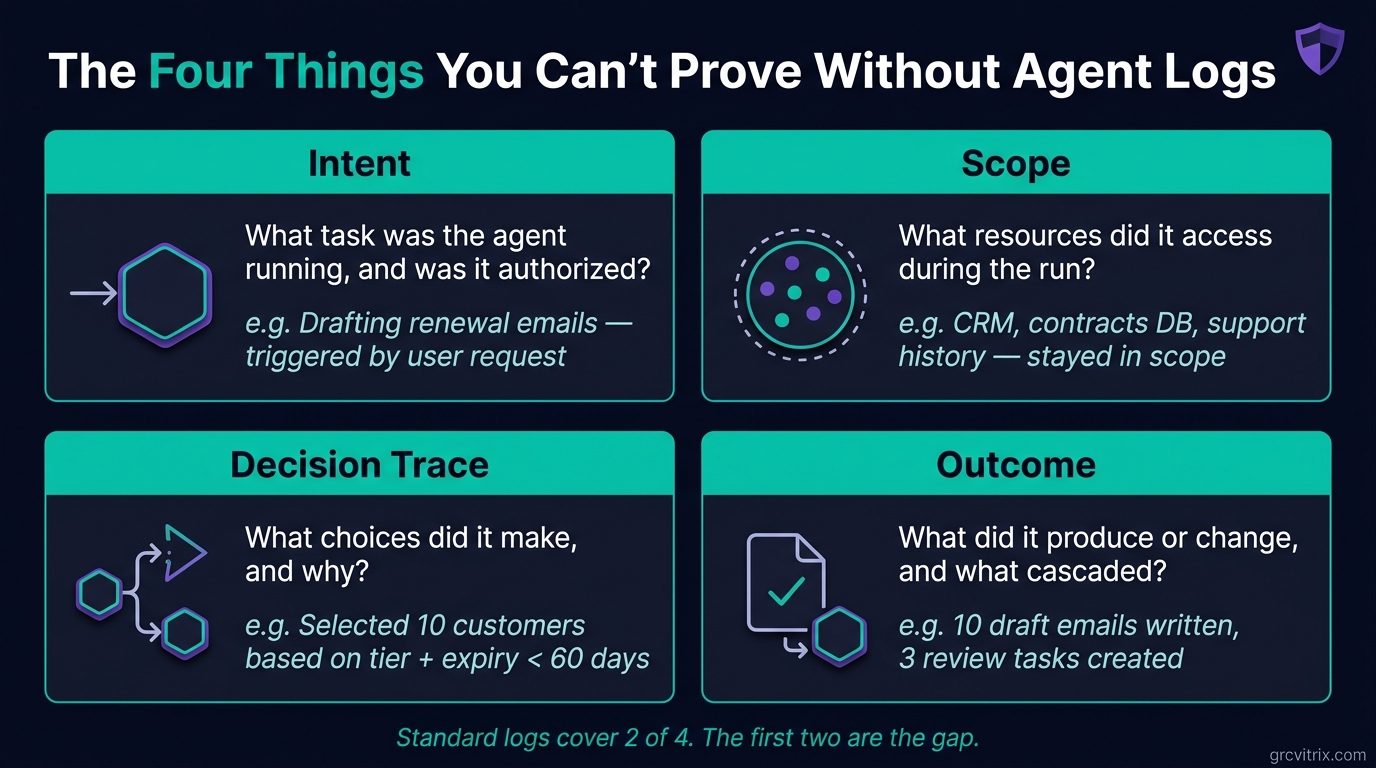
Standard logs tell you that something happened. They don’t tell you why or whether it should have. When auditors or incident responders need to trace an agent event, they need four layers:
Intent. What task was the agent running? Was it user-triggered, scheduled, or invoked by another system? Was the trigger authorized under your policy?
Scope. What resources did it touch? Did it stay inside its defined boundaries, or did it reach data it wasn’t supposed to?
Decision trace. What choices did it make during execution? If it accessed file A but not file B, why? If it escalated an action or called a more permissive API, what triggered that?
Outcome. What did it produce or change? What are the downstream effects, and in what order did they happen?
Your existing logs cover scope and outcome reasonably well. They almost never cover intent or decision trace. That’s the gap.
This isn’t theoretical. The same gap broke threat modeling for early-stage teams a few years back — teams could describe their architecture but not explain why specific design choices were made when an auditor asked. We covered the practical fix for that in our 60-minute MVP threat modeling pillar post, and the parallel here is exact: SOC 2 doesn’t require new artifacts, it requires evidence that decisions were intentional and reconstructable.
 Standard logs cover 2 of 4. The first two are the gap.
Why This Will Be a Real Audit Finding by 2027
Auditing standards always lag deployment by a few years. They catch up.
A few signals worth tracking:
- The AICPA has been quietly working through how AI-assisted systems fit into Trust Services Criteria. Public guidance hasn’t shipped yet, but it’s coming.
- NIST published SP 800-53 Rev. 5 updates to logging controls that emphasize “system component” monitoring — language that pulls AI agents into scope without naming them.
- OWASP’s LLM Top 10 includes “insufficient logging and monitoring” as a top concern — at the architectural level, this is the same problem.
- Forward-thinking auditors are already asking the questions standard logging tools can’t answer. The Big Four firms are training their teams on agent-specific risks. Smaller boutique firms are following.
The gap nobody talks about today will be the audit finding everyone’s managing by 2027. Teams that build agent observability now will be a year ahead of their peers when the questions become standard.
What Good Agent Observability Actually Looks Like
Organizations getting ahead of this are building what practitioners call agent observability — structured logging that captures behavior, not just system events. The components:
Session-level tracing. Every agent run gets a unique session ID. Every downstream action — every API call, database query, file read, model invocation — carries that session ID. When an auditor asks “what did the agent do for request 47892?”, you query the session ID and get the full trace.
Authorization records. Who or what initiated the session? Under what policy? With what permissions at the time of execution? If an agent’s permissions change midway through a long-running session, that change is logged.
Action manifests. Structured logs of every read, write, API call, and state change — linked back to the originating session and timestamped consistently. This is what your SIEM already does for humans. Extend the schema to agents.
Decision artifacts. Where the model and your architecture support it, preserved records of key decision points. What was the agent asked? What data did it consider? What did it choose, and what alternatives did it discard? You don’t need to log every token of every inference call — you need to capture decision-relevant inputs and outputs at well-defined points.
Diff records. Before-and-after states for anything the agent modified. Queryable by session ID. This is what makes incident response and audit reconstruction tractable.
None of this requires inventing new SOC 2 controls. It requires extending your existing privileged access monitoring to treat agent sessions the way you treat privileged human sessions. The SOC 2 controls already exist — CC6.6 and CC7.2 specifically. The implementation just needs to catch up to what AI agents actually do.
What to Do Before Your Next Audit
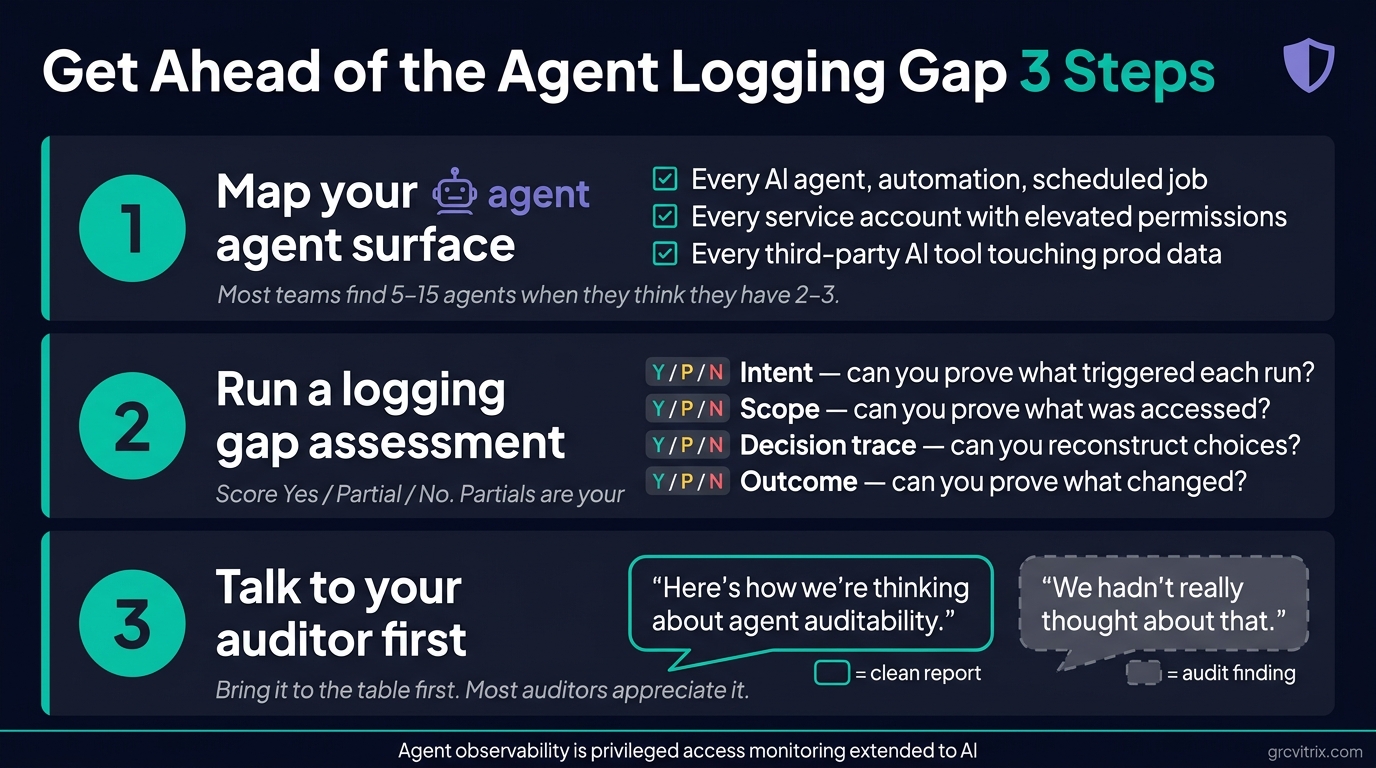
Three things, in order:
 Three steps to take before your next audit.
1. Map your agent surface
List every AI agent, automation, or scheduled workflow that touches in-scope systems. Don’t limit this to the obvious LLM-based agents. Include:
- API integrations that act on customer data
- Scheduled background jobs (nightly syncs, batch processing)
- Anything operating under a service account with elevated permissions
- Internal “automation” or “AI assistant” features your team has shipped
- Third-party AI tools your team uses against production data
You’ll be surprised how long this list gets when you actually write it down. Most teams discover they have 5-15 agents in scope when they think they have 2-3.
2. Run a logging gap assessment
For each agent on your list, ask the four questions an auditor would:
- Intent: Can I prove who or what triggered each agent run, and that the trigger was authorized?
- Scope: Can I prove what data and systems the agent touched during a specific run?
- Decision trace: For meaningful decisions during the run, can I reconstruct what the agent considered and chose?
- Outcome: Can I prove what changed as a result, and what downstream effects were triggered?
Score each one Yes / Partial / No. The Partial and No items are your gap list.
3. Start the conversation with your auditor
Teams that get ahead of this bring it to the table first. The conversation goes one of two ways:
“Here’s how we’re thinking about agent auditability. We’ve mapped 7 agents in scope. We have full coverage on 4 and partial coverage on 3. Here’s our remediation plan.”
“We hadn’t really thought about that.”
The first conversation produces a clean Type 2 report with maybe one observation and a remediation timeline. The second produces a finding.
Most auditors will appreciate that you raised it proactively. A few of the better ones will help you scope what evidence they’d actually need, which saves you from over-engineering.
The SOC 2 Implication for Early-Stage SaaS
If you’re a SaaS team approaching your first SOC 2 with AI features in your product, three practical things to internalize:
The framework already covers this. You don’t need to wait for new SOC 2 guidance on AI agents. CC6.6, CC7.2, and CC7.3 already require monitoring and reconstruction of activity by anything authenticated to your system. That includes service accounts. That includes AI agents.
The implementation cost is lower if you do it now. Retrofitting agent observability after you’ve shipped 15 agents is significantly more expensive than building it into the second one. The marginal effort to add session-level tracing to a new agent during development is small. The effort to add it to an existing agent in production is much larger.
This is a competitive signal. Enterprise buyers running their own vendor security reviews are starting to ask about AI agent monitoring. Being able to answer “yes, every agent run is traced, authorized, and reconstructable” is becoming a sales advantage. Most of your competitors won’t have a good answer.
The Boring Take
SOC 2 was built for a world where humans took actions and machines recorded them. That world is changing faster than most compliance teams realize.
The fix isn’t dramatic. It’s extending an existing logging discipline to a new class of authenticated actor. The teams that do this in 2026 will have a cleaner audit story, faster incident response, and a real answer when an enterprise customer asks how AI access to their data is governed.
The teams that don’t will have a gap. And the gap is going to show up in audit reports.
If you’re shipping AI features and you don’t have a clear answer to “what did our agent do for that user last Tuesday?”, that’s a project worth scoping this quarter — before it becomes an audit finding next year.
If you’re working through SOC 2 readiness for an AI-enabled SaaS product, GRC Vitrix publishes practical content on the intersection of AI, security, and compliance. We’re working on a free Agent Observability Audit Checklist as a follow-up to this post — join the newsletter to get it when it ships.
Last reviewed: May 2026.